Why Windows 11 Widgets Fall Short in 2026
When Microsoft shipped the Widgets Board with Windows 11, it looked like the end of a long-running complaint. Windows had gone without first-party desktop widgets for roughly a decade — the Windows 7 sidebar was gone, Windows 8's live tiles had quietly died on the desktop, and Windows 10 gave us News and Interests, which was mostly a news feed dressed in a weather icon. Finally, in Windows 11, a button labelled "Widgets" with a panel full of cards. The pitch wrote itself.
A few years in, the reception is more muted than Microsoft probably hoped. Search autocomplete for "Windows 11 Widgets" is full of phrases like useless, bad, disable, remove. A lot of people try it, then turn it off and forget about it.
This post is an honest look at why. Not a hit piece — Microsoft made real choices, some of them for real reasons — but an attempt to name, specifically, what the Widgets Board gets wrong, what it gets right, and what to use instead if you actually want widgets on your desktop in 2026.
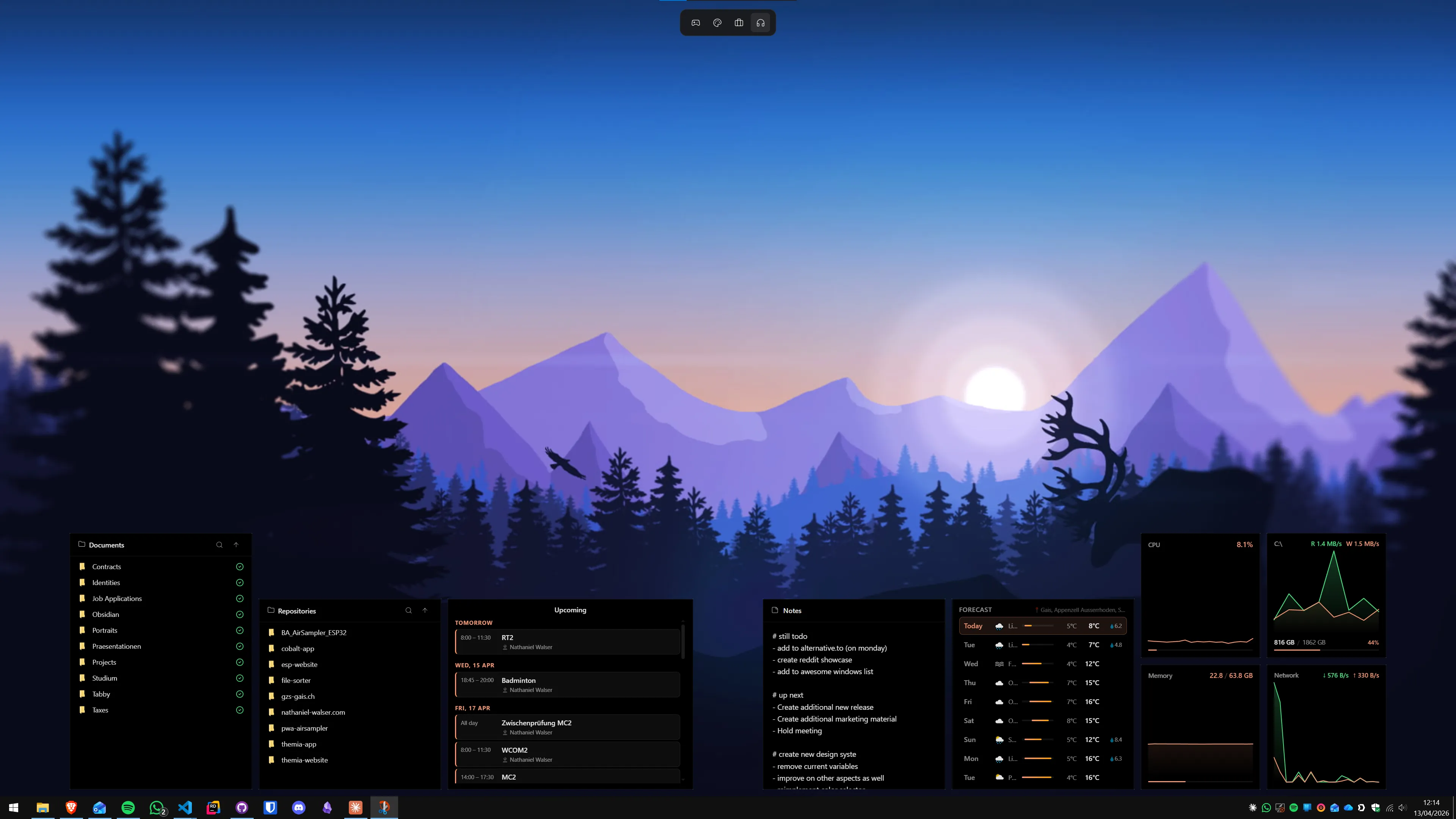
1. They're not actually on the desktop
This is the core problem, and everything else is downstream of it. The feature is called "Widgets." The icon lives on the taskbar. But clicking it does not put anything on your desktop — it opens a roughly half-screen panel that floats over whatever you were already doing.
Historically, "widget" has meant something specific. The Windows 7 sidebar gadgets sat along the right edge of the desktop, visible whenever the desktop was. macOS widgets live on the desktop in Sonoma and later. Android widgets are on the home screen. iOS widgets are on the home screen and lock screen. In every one of those cases the defining property is the same: the widget is already there, and you glance at it in the middle of doing something else.
The Widgets Board inverts that. To see your calendar, you click a button, wait for the panel to animate in, and read it while it covers half your screen. Then you dismiss it to do anything else. That is not a widget experience — that is a small app launcher with a specific content type.
You can reasonably argue that a panel is a more focused interaction than always-on clutter, and for some people that is true. But it means the Widgets Board can never answer the original question that makes widgets useful in the first place: what's happening right now, without me interrupting what I'm doing? The panel design forces you to choose between "widget visible" and "actually working." That is a strange choice for a feature named Widgets.
2. The MSN feed dominates everything
Open the Widgets Board on a fresh install and the first thing you see, taking up most of the real estate below the handful of cards at the top, is an MSN news feed. Sports scores. Celebrity stories. Clickbait tiles. Some of it is fine, some of it is not, and none of it was what you opened the panel for — you clicked the button to check the weather or your calendar.
You can tune the feed. You can hide individual stories, tell it you want fewer of a given topic, pin cards you care about above the feed. But the feed is the product, not an accessory to it. The Widgets Board is, for Microsoft, a surface for the same MSN content that also powers the Edge new tab and the Windows lock screen Spotlight. That is an advertising business, and it is not going away because users find it annoying.
This is the part where being fair matters: Microsoft built something free, built into the OS, that has to pay for itself somehow, and the news feed is how. That is a legitimate business model and it is the reason the panel exists at all. But it also means the feature will always prioritize the feed over your widgets, because the feed is the one that pays the bills. If your mental model of a widget panel is "a quiet place for my calendar and my weather," the Widgets Board will keep disappointing you, because that is not quite what it is.
3. The widget catalog is tiny
Start listing what's actually available in the default Widgets Board and the list ends quickly: weather, calendar, to-do, a traffic card, sports, esports, a watchlist, a photo widget, a handful of third-party cards (Spotify, Messenger, a few others). That is most of it.
Compare that to what a modern desktop widget app ships with as standard in 2026: files and folders, email (with OAuth into Outlook or Gmail), calendar with real read/write, system stats (CPU, GPU, RAM, disk, network, temperatures), a music widget tied to whatever is playing, stocks, notes, to-do lists, RSS readers, GitHub dashboards, battery, clocks across time zones. That is not an exotic list — it is the table-stakes set that Rainmeter skinners built twenty years ago and that Themia and XWidget ship today.
There is a developer API for third-party widgets on the Widgets Board, and a few companies have published widgets for it. But the submission process is narrow, the discovery surface is buried, and the result is that three years in the third-party catalog is still small. Contrast that with the Windows 7 gadget platform, which had a community gallery with thousands of entries inside a year, or Rainmeter's Reddit-driven skin ecosystem.
A widget system is only as useful as the things you can put in it. The Widgets Board has a short shelf.
4. No layout control
The panel is a fixed width, pinned to the left edge of one screen, laid out as a grid. You can reorder cards within that grid and expand or collapse some of them. That is the extent of layout customization.
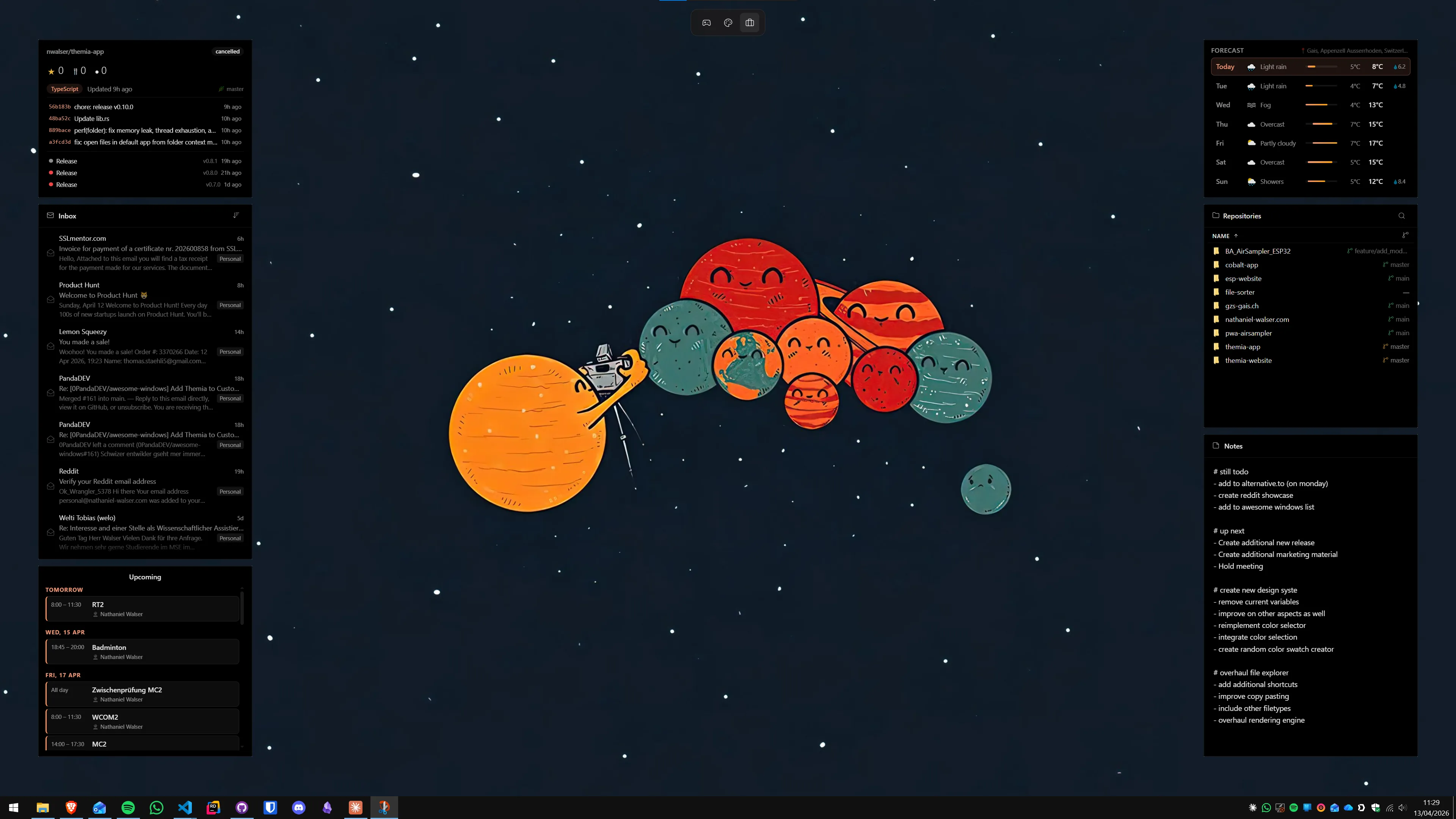
There is no way to make the panel narrower or wider. No way to have it open on your second monitor instead of your primary. No way to have one layout for your laptop screen and a different one for your external display. No way to save a "work" layout with heavy email and calendar emphasis and a "personal" layout with music and RSS. No way to have two panels at once.
For a lot of single-monitor casual users this does not matter — the panel is what it is, and it is fine. But if you have two or three monitors, or you switch contexts during the day, the Widgets Board quietly forces you into one narrow pattern. The widgets it gives you are not the shape of your desk.
Desktop widget apps solve this by not being a panel at all. Themia's widgets can sit anywhere on any monitor, at any size, and you can save multiple per-screen layouts and switch between them. Rainmeter lets you place skins pixel-by-pixel on any display. XWidget has similar freedom. These features are not exotic — they are what you get when you drop the panel model.
5. Microsoft keeps killing widgets
This one is not about the current Widgets Board specifically, but it is relevant context for anyone deciding whether to invest time in the feature. Microsoft has a long and not-great track record with desktop widgets:
- Windows 98 Active Desktop. Put live web content on the desktop. Quietly deprecated in Vista.
- Windows 7 sidebar gadgets. Actually good, widely used, and killed in 2012 for security reasons. Microsoft even removed the feature from Windows 7 in a later update.
- Windows 8 live tiles. Not desktop widgets exactly, but the closest thing at the time. Phased out.
- Windows 10. No native widgets. News and Interests arrived late in Windows 10's life and was limited.
- Windows 11 Widgets Board. The current version — and already visibly a different product than it was at launch, with the news feed shrinking and growing repeatedly as Microsoft tunes it.
Some of these shifts had good reasons. The Windows 7 gadget platform really did have security issues, and deprecating it was defensible. But the pattern from the user's side is the same: if you built your desktop workflow around a first-party widget system on Windows, at some point Microsoft changed or removed it.
That is not a prediction that the Widgets Board will disappear. It probably will not, at least not soon. But the track record makes it reasonable to prefer a third-party app with its own momentum over a Microsoft feature that might look very different two Windows releases from now.
What the Widgets Board actually does well
It would be unfair to stop there. The Widgets Board is not a disaster — it is a specific product for a specific user, and that user exists. Being honest about the good parts matters.
Zero install. It is already on your machine. No download, no license, no extra process to launch. For someone who just wants "weather, sometimes," that is a real win. You open it twice a week and close it.
Microsoft 365 integration is frictionless. If you are signed into Windows with a Microsoft account, your Outlook calendar and To Do items show up without any OAuth dance. That is the single smoothest calendar integration on Windows — third-party apps can match it but nothing beats it.
The weather and calendar cards are genuinely useful. The weather card is clean, accurate, and shows a real forecast. The calendar card is a readable agenda of your day. Both are exactly what you want when you open the panel.
It's free, forever, and maintained by Microsoft. You will never have to pay for the Widgets Board, and it will keep working across Windows updates. That is a meaningful floor.
The honest summary is this: the Widgets Board is low effort for low reward. If your entire widget ambition is a weekly weather check and a glance at tomorrow's meetings, it is fine. The problem is not what it does — it is that people hear "widgets" and assume more.
What actually works (on the desktop)
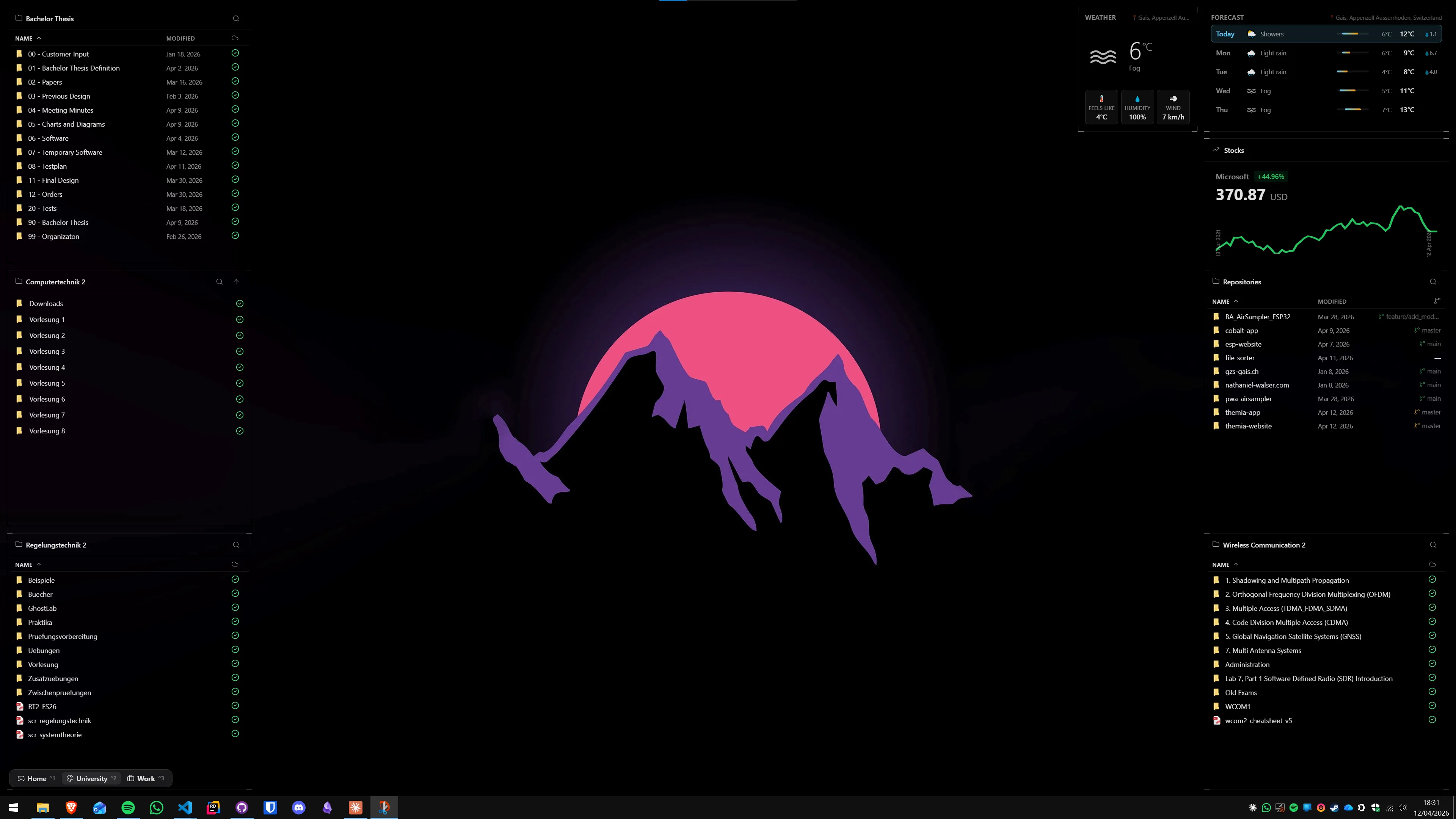
If after reading this you want widgets that are actually on the desktop, with a real catalog and real layout control, the good news is that in 2026 the third-party options are genuinely strong. Three to know:
Themia is the one we build, and in the interest of disclosure it is the one we recommend for most people. It is a native Tauri app that stays under 10 MB installed, with widgets that live on the wallpaper rather than in a panel. It ships with files, email (OAuth into Outlook and Gmail), calendar, weather, system stats, stocks, music, notes, to-do, RSS, GitHub, and a handful of others. Every widget shares the same design language, so a finished setup looks designed rather than assembled. You get a visual editor instead of config files, per-screen switchable layouts, and a free tier that covers a real workflow; Pro is a one-time $19. We would like you to try it.
Rainmeter is free, open source, nearly twenty years old, and still the right pick for people who enjoy the customization process itself. Every incredible-looking Windows desktop you have seen on Reddit was probably Rainmeter. It expects you to download skins, edit INI files, and build your setup piece by piece. If that sounds like a feature, you will love it. If it sounds like a chore, look elsewhere.
XWidget sits between the two. It has a visual widget designer, a large community gallery of user-submitted widgets, and works across older Windows versions. The aesthetic is inconsistent because every community author has their own taste, but the flexibility is real.
Further reading on the same theme: Themia vs Windows 11 Widgets (the direct comparison), the best Windows desktop widget apps in 2026, Rainmeter alternatives for people who want the result without the config files, and how to cleanly disable the Widgets Board if you have decided it is not for you.
A note on the Widgets Board's future (speculation)
Everything in this section is guessing, clearly labelled.
Microsoft keeps iterating on the Widgets Board, and the shape of it in 2028 is unlikely to be exactly the shape of it today. The last couple of years have seen the panel resize, the feed grow and shrink, more third-party cards appear, and integration with Copilot come and go depending on the build. It is plausible that a future version becomes much better — a wider panel, a richer catalog, a proper on-desktop mode, even. That would be great.
It is also plausible, based on Microsoft's history with desktop widget features, that the Widgets Board gets folded into something else, or narrowed, or quietly maintained rather than grown. That would not be surprising either.
The practical takeaway is not "don't use the Widgets Board" — it is "don't build a workflow on top of it that would hurt to lose." For a weather glance, it is safe. For anything you actually need in front of you every day, a third-party app with its own momentum is the safer bet.
Conclusion
The Widgets Board is fine as a weather-and-calendar glance and disappointing as a widget experience. It lives in a panel instead of on the desktop, its feed is louder than its widgets, its catalog is small, its layout is locked, and the platform it stands on has shifted underneath users more than once. Some of those are defensible trade-offs — the news feed is how the feature pays for itself, the panel is simpler than free-form — but none of them change the fact that most people searching "Windows 11 Widgets useless" are not being unfair. They are describing what they actually experienced.
If widgets matter to you at all, put them where widgets belong: on the desktop. Themia has a free tier; the download is small. Give it a weekend.
FAQ
Are Windows 11 Widgets going away?
Microsoft has not announced an end-of-life for the Widgets Board, and as of 2026 it is still being updated. That said, Microsoft has a long pattern of launching and then shrinking desktop widget features (Active Desktop, Windows 7 sidebar gadgets, Windows 10 News and Interests), so it is reasonable to assume the current form will keep changing. The feature is unlikely to disappear overnight, but investing heavily in the built-in widget catalog is a bet on Microsoft keeping course.
Can I put Windows 11 Widgets on the desktop instead of a panel?
No. The Widgets Board is a pop-out panel that slides over your screen from the taskbar — the widgets inside it cannot be detached to the wallpaper. If you want widgets that actually sit on the desktop, you need a third-party app like Themia, Rainmeter, or XWidget.
Is the Windows 11 Widgets Board the same as Windows 10 News and Interests?
It is the same lineage. News and Interests launched on Windows 10 as a taskbar flyout that was mostly an MSN news feed with a weather preview. The Windows 11 Widgets Board expands that into a full-height panel with additional widgets (calendar, traffic, sports, some third-party), but the underlying content engine is still MSN.
Why is the MSN news feed so prominent?
The news feed is ad-supported content that Microsoft surfaces across Windows, Edge, and MSN. The Widgets Board is one of the places that feed is shown, which is why it takes up so much of the panel by default. You can hide individual stories and tune the feed, but the feed itself is core to the product and is not going away.
What's the best widget app for Windows 11 in 2026?
For most people the answer is Themia — it is a native Tauri app under 10 MB, puts widgets directly on the desktop, has a visual editor, ships with widgets for the things people actually want (files, email, calendar, weather, system stats, music, notes, to-do, RSS, GitHub), and has a free tier. Rainmeter is the pick for tinkerers who enjoy building from config files. XWidget is a middle ground.
Does disabling Widgets improve performance?
On modern hardware the performance impact of the Widgets Board is small, but the process is not free — it runs a web-based panel backed by Edge WebView2 and keeps a background process alive to refresh the feed. On low-RAM machines disabling it can free a noticeable amount of memory. If you never use the panel, turning it off is a reasonable cleanup regardless of performance.