GitHub repository
Activity, CI status, commits, pull requests and issues for one repository.
What it does
Watches a single repository and shows what is happening in it.
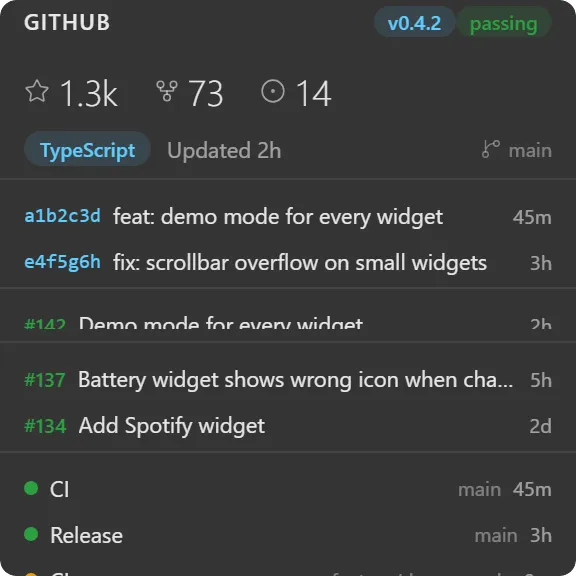
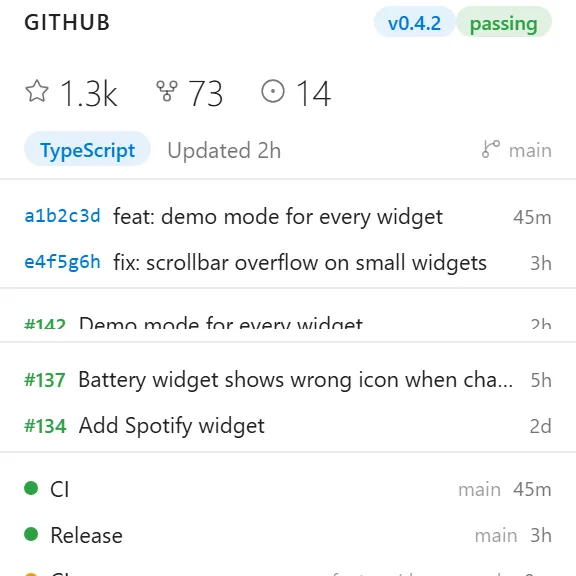
The header carries the repo name, its latest release tag, and the status of the most recent workflow run: passing, failing, running or pending. Below that a stats row shows stars, forks and open issues, and a meta row shows the primary language, when it was last pushed to, and the default branch.
Then the lists, each with a configurable length:
- Commits: short SHA, first line of the message, relative time.
- Pull requests: number coloured by state (purple merged, green open, red closed), title, age. Filterable by state and sort order.
- Issues: number, title, age. Pull requests are filtered out, so the issue list is actually issues.
- Pipelines: a status dot, workflow name, branch and time.
The release badge is clickable and opens the release page.
Where the data comes from
The GitHub API, queried directly from your machine. Public repositories work without signing in; connect a GitHub account for private repos and higher rate limits.
A 404 on a repository you know exists usually means a missing token scope, and the widget says so rather than showing a bare error.
Limits
- One repository per widget. For work spread across repos, use Notifications, Review requested or Assigned issues.
- Read-only: it does not merge, comment, or re-run workflows.
- Refresh is on a timer you set in minutes, not a live webhook.