Where to Download Windows 11 Themes Safely (2026)
Search windows 11 themes download and the first page is almost entirely download portals. None of them will ever publish an honest ranking of download portals. So here is one.
This is not a gallery. It is a map of where Windows 11 theme files come from, who hosts the author's own file and who re-hosts it, which sources make you register, which credit the artist, and what to look at inside an archive before you double-click it.
First: three different things are called a "theme"
Which source is right depends entirely on which of these you actually want, and most download portals blur the distinction deliberately.
- A theme pack. A
.themepackor.deskthemepackcarrying wallpapers, an accent colour, cursors and sounds. Underneath it is a renamed CAB archive of images and a plain-text.themefile. No system modification, no administrator prompt, nothing to patch. - A visual style. A
.msstylesplus a.themepointing at it. This is what changes title bars, borders, scrollbars and control colours. Windows only loads styles signed by Microsoft, so a community one needs a patcher — and that patcher, not the theme, is where the risk lives. - A SkinPack or shell mod. A bundle replacing system icons, shell resources and sometimes the boot screen to imitate another OS. Ships as an installer, changes the most, uninstalls the least cleanly.
If you want a nicer desktop, you want a theme pack and need none of this. If you want Windows to look genuinely different, you want a visual style and you need to be deliberate about downloads. Full breakdown of what each layer changes: Best Windows 11 Themes and Icon Packs (2026).
The sources, compared
Judged on things that can be checked: does the source host the author's own file, does it make you register, does it name the person who made it.
| Source | What you get | Author's own file | Account needed | Artist credited |
|---|---|---|---|---|
| Microsoft Store (via Settings) | Wallpaper, colour, cursors, sounds | Yes — publisher uploads directly | Store may prompt for sign-in | Yes, publisher name on listing |
| GitHub (author's repo) | Theme files and patchers, plus source | Yes — release assets from the repo | No | Yes, by construction |
| DeviantArt (artist gallery) | ZIP/RAR with .msstyles and .theme | Yes — uploaded by the artist | Often, free account | Yes, it is their gallery |
| WinCustomize (Stardock) | Skins, visual styles, icons, cursors | Yes — uploaded by members | Yes, free registration | Yes, per uploader |
| Theme portals (themepack.me etc.) | Mostly .themepack wallpaper packs | Usually re-hosted | Typically no | Often no credit line |
| SkinPack sites | Installer-based full skins | Site-built bundles | Free and paid tiers | Credits page exists; varies per pack |
| Software mirrors & lookalike domains | Re-hosted copies of other people's tools | No | No | Frequently not |
1. Microsoft Store — the boring answer, and the correct one for most people
Open Settings > Personalization > Themes and click Browse themes. The packs are free, install in one click, are listed under a publisher name, and cannot touch anything outside your user profile.
The honest limitation: these are wallpaper-and-colour packs. No flat title bars, no dark File Explorer. But if a Store theme is all you need, you have skipped every problem the rest of this page is about.
2. GitHub — best source for anything that has to run as administrator
Every tool here that patches Windows should come from a repository you can read. SecureUxTheme by namazso lives at github.com/namazso/SecureUxTheme; its release tags carry the maintainer's verified signature and the current major release is v4.0.0. It patches the signature check in memory rather than replacing system DLLs, which is why it is the one usually recommended on Secure Boot machines.
GitHub is also where some theme authors publish. niivu — whose visual styles are among the most-installed on Windows — maintains niivu/Windows-10-themes and a set of icon themes for Windhawk's Resource Redirect mod, both updated during 2026, while publishing the Windows 11 styles on DeviantArt. That is the general rule in miniature: find the artist first, then follow them to whichever platform they actually use.
What GitHub buys you is a checkable chain — release assets, file sizes, commit history, issues reported in public. No download button that is really an ad.
3. DeviantArt — where the actual artists are
Most Windows 11 visual styles circulating on portals were made by a fairly small group of people, and most of them post to DeviantArt. From the artist's gallery you get the file they packaged, at the version they last updated, with their install notes attached and their name on it.
Two frictions: downloads frequently require a free account, and some artists gate galleries behind a follow. Files arrive as ZIP or RAR — extract and inspect before running anything, since packs sometimes include .reg files for window metrics.
4. WinCustomize — moderated, attributed, registration-walled
Stardock's community site has hosted skins, visual styles, icon sets and cursors for over two decades. Uploads are attributed to member accounts and the library is moderated. Downloading requires a free account; a paid subscription removes ads and download limits. A large share of the catalogue targets Stardock's own WindowBlinds rather than raw .msstyles, so check what a skin is for first.
5. The theme portals — fine for wallpapers, thin on provenance
Sites like themepack.me exist to serve exactly the query that brought you here, and for wallpaper packs they mostly do the job: browse by category, download a .themepack, double-click. On the listing pages I checked, themes appeared as a name plus a category with no author credit line — the general pattern across this tier. That does not make a file unsafe. It does mean you cannot tell who made the wallpaper or what version you are getting.
SkinPack sites differ slightly: skinpacks.com publishes a credits page naming designers it says it commissions or licenses from, and routes anyone whose work appears without permission to a DMCA process. Its output is installer-based, which puts it in the category needing the most scrutiny.
The rule for this tier: use it to discover a theme, then find the author and download from them.
6. Mirrors and lookalike domains — the part nobody warns you about
This is the failure mode most likely to bite you, and it has nothing to do with the themes themselves.
UltraUXThemePatcher is written by M. Hoefs and published on his own site, mhoefs.eu, where version 4.5.0 was released on 30 September 2025 as a free 160 KB download with a version history and an FAQ. His page states plainly that the tool modifies system files and that this can lead to problems up to a broken Windows install.
There is also a separate domain, ultrauxthemepatcher.com, which presents itself as the tool's home and tells visitors in its FAQ that it is the only genuine address and to avoid other sites offering free downloads. It does not link to mhoefs.eu anywhere I could find, and does not name the author. Softonic and lo4d carry mirrored listings too. I am not claiming any of these ships something harmful — I did not test the binaries and will not assert what I have not verified. The point is narrower: for a tool whose whole job is patching system DLLs, "which of these four pages belongs to the author" should be answerable before you download, and search results will not answer it for you.
The check takes thirty seconds. Find the author, find their page, download there.
How to check a theme file before you run it
- Check the extension.
.themepackand.deskthemepackare safe formats — archives of images and text. A.zipor.raris expected for visual styles. An.exenamed after a theme is an installer, and installers are where bundled extras live. - Open the archive before applying it. Rename a
.themepackto.cab, or extract the ZIP. You should see images, a.theme, possibly.msstyles, cursors and sounds. Anything else deserves a second look. - Read any
.regfile in a text editor. They are plain text. Theme packs legitimately include them for window metrics, but know which keys are being written before you double-click. - Cross-check the source against the author. Search the artist's name. If their own page has a newer version than the portal, take theirs.
- Create a restore point before your first patch. Only relevant for visual styles, but it is the difference between an annoyance and a reinstall.
- Scan any executable, and keep the installer. Upload it to VirusTotal, and if it is a SkinPack, keep the installer so its uninstaller is available later.
Step-by-step installation of a visual style — patcher, theme folder, applying it, backing out — is in How to install custom themes on Windows 11. Icons are a separate mechanism: Best Windows 11 icon packs.
Red flags on a download page
- A theme delivered as a single
.exewith no archive alternative. - A "download manager" or "download assistant" you have to install first.
- Two or more download buttons where the larger one is an ad.
- Instructions telling you to disable Windows Defender before extracting.
- A site claiming to be the sole official source for someone else's tool without naming that person.
- No author, no version, no date anywhere on the page.
Where widgets fit into this
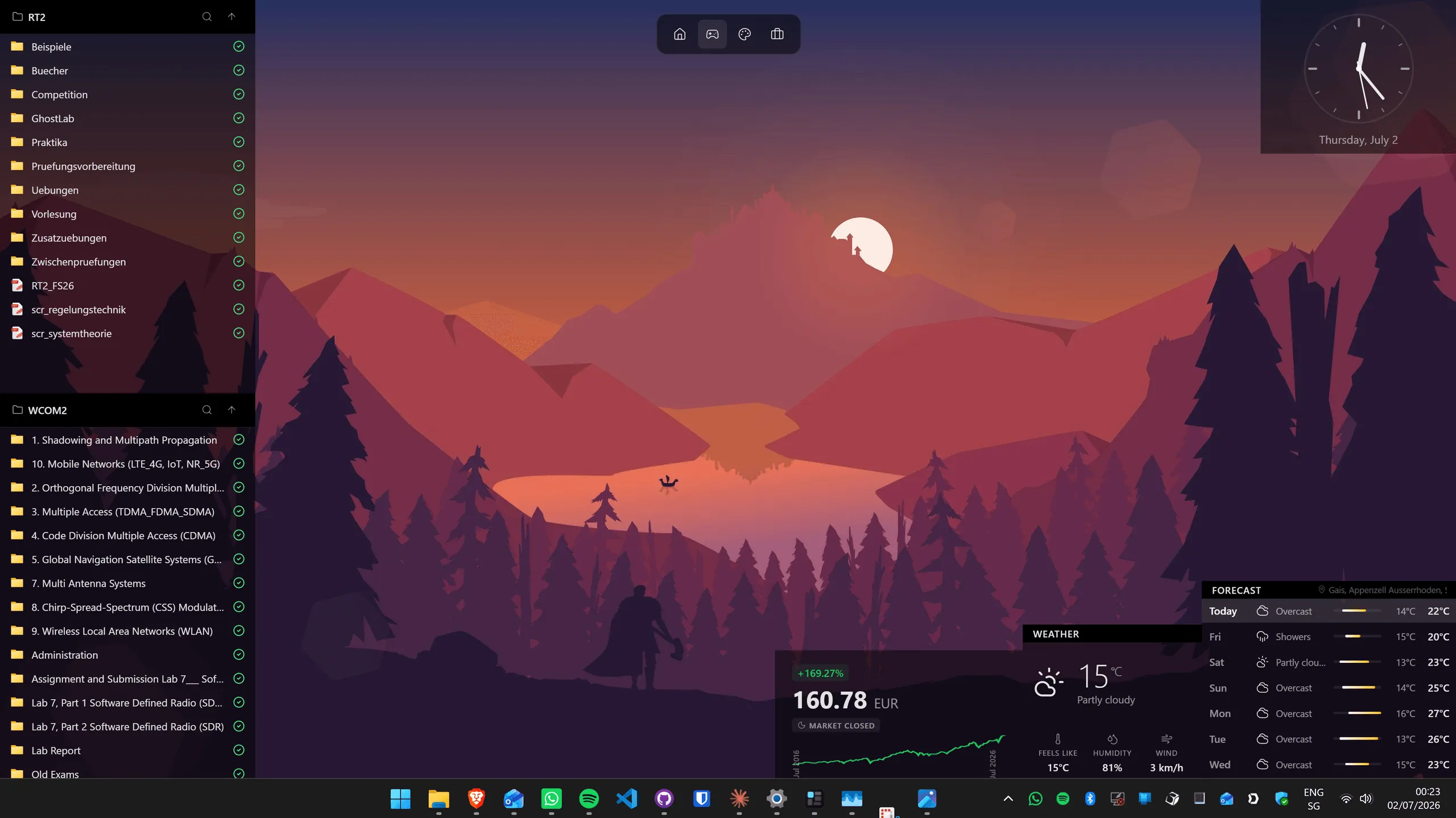
Plainly, since this is a widget app's blog: Themia is not a theme app. It ships no visual styles, does not patch uxtheme, and will not change your title bars. It sits in the layer above — Clock, Weather and Forecast, Folder, Notes, To-Do, Calendar, Email, Stocks, GitHub, RSS, Now Playing, Gallery, and system widgets for CPU, RAM, GPU, disk, network and battery — placed over whatever wallpaper you chose.
Its relevance here: a Store theme pack for the backdrop plus widgets on top gets a lot of people most of what they wanted from a "theme", with nothing running as administrator. If you want the deeper visual style too, the layers do not conflict. Broader tour: the Windows desktop customization guide.
The short version
- Just want it to look nicer: Settings > Personalization > Themes > Browse themes. Stop there.
- Want a real visual style: find the artist, download from their gallery or repo, get the patcher from its author's site.
- Found it on a portal: fine — now go find who made it and download from them instead.
- Anything that runs as administrator: GitHub or the author's own domain. Nowhere else.
FAQ
Where is the safest place to download Windows 11 themes?
Settings > Personalization > Themes > Browse themes, which opens the Microsoft Store. Those packs are wallpaper, accent colour, sounds and cursors only — no system files are touched and nothing has to be run as administrator. If you want a deeper visual style that changes window chrome, go to the artist directly: their DeviantArt gallery or their GitHub repository. The tools those styles need should come from their author too, not from a mirror.
Are .themepack and .deskthemepack files safe to open?
A .themepack or .deskthemepack is a renamed CAB archive holding images, a .theme text file, and sometimes cursors and sounds. There is no executable code in that format, so double-clicking one applies a theme rather than running a program. Rename the extension to .cab and open it first if you want to see what is inside. The real risk is not the format — it is a download page handing you an .exe named after a theme.
Do I need SecureUxTheme or UltraUXThemePatcher just to change my wallpaper and colours?
No. Wallpapers, accent colours, cursors, sounds, light and dark mode and Microsoft Store theme packs all work on an untouched Windows install. A patcher is only needed for third-party visual styles — .msstyles files — because Windows refuses to load styles Microsoft has not signed. If a page claims a patcher is required for a plain wallpaper pack, the file is not what it claims to be.
Why does my antivirus flag theme patchers?
Because of what they do, not necessarily because they are malicious. UltraUXThemePatcher replaces theme-related system DLLs and its author warns on his own site that this can cause problems up to a broken Windows install. SecureUxTheme patches the signature check in memory instead. Both behaviours look exactly like the techniques real malware uses, so heuristics fire. That is a reason to be careful about where you get them, not a reason to disable your antivirus.
Do theme download sites credit the original artist?
It varies, and it is worth checking. Artist galleries on DeviantArt and repositories on GitHub credit by construction — the file lives under the author's name. WinCustomize attributes every upload to an account. Some aggregators publish a credits page; skinpacks.com names designers it says it commissions and provides a DMCA route. Others list a theme name and a category and nothing else.
Can a Windows theme file actually contain malware?
The theme resources themselves — images, colour definitions, .msstyles — are data, not code. What travels alongside them can be code: an installer .exe, a .bat, or a .reg that writes to the registry when double-clicked. Extract every archive and read the file list before running anything. If it contains only images, a .theme and a .msstyles, nothing in it can execute on its own.